
Launching your own website also has its own level of happiness in which we are very excited about the site and its looks and when your site gets launched but if the speed of that site is very slow or not that good then there will be some disappointment in your mind. Since the speed of the site matters a lot in many cases, in such a situation if you are a website developer then you will definitely look for a solution for it but if you are not a developer then it can definitely be a headache for you regarding the speed of the site.
If you want your WordPress website to load super fast, rank higher, and give users the best browsing experience, then improving your PageSpeed score is one of the smartest things you can do. Many people struggle to reach even 70–80, but getting 90+ or even a perfect 100 score is absolutely possible with the right setup.
At WPErrrorFixer, we help people fix slow WordPress websites, solve errors, improve security, and maintain healthy sites. In this guide, you will learn exactly why sites score high and how you can do the same with easy, actionable services steps. but
Let’s dive in.
What Exactly Is Your WordPress Performance Score?
Google’s PageSpeed Insights tool checks how fast your website loads on both mobile and desktop. This single score is a health report for your site, and it depends on several key factors:
Server speed and Time to First Byte (TTFB)
Image size and compression
Theme structure and code efficiency
HTML/CSS/JS optimization (minification and deferral)
Caching layers and delivery networks (CDN)
Lazy loading implementation
Overall plugin impact
A high score means your website is lightweight, fast, and well-optimized across the board.
The 100/98 Secret: A Look at Wperrrorfixer’s Setup
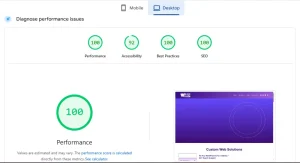
Curious how sites like wperrorfixer.com achieve a near-perfect score of 100 on Desktop and 98 on Mobile? The reason isn’t luck; it’s a commitment to efficiency and clean structure, even while using powerful tools.
You can check my site speed using any speed checker tools like PageSpeed Insights or GTmatrix.
Here are the four pillars of a lightning-fast WordPress site:
1. Adopted Only WebP Images for Maximum Compression
Images are the heaviest files on most websites. The game-changer here is converting everything to WebP.
WebP reduces image size by 30–50% compared to traditional JPG/PNG without losing visible quality.
Fewer KB = faster loading = higher score. This is non-negotiable for high mobile scores.
2. Hosted on a High-Performance LiteSpeed Server
The server is the engine of your website. LiteSpeed servers are specially designed to handle more traffic with less load, significantly improving your TTFB (Time to First Byte)—a core speed metric.
3. Mastered Optimization with the LiteSpeed Cache Plugin
This plugin, designed to work seamlessly with the LiteSpeed server, is one of the biggest reasons behind the 100 score. It efficiently manages complex optimizations:
HTML/CSS/JS minification: Cleans up and compresses code.
Image lazy loading: Ensures images load only when needed.
Cache preloading and server-level optimization.
4. Maintained a Simple, Clean Website Structure
Even while using heavy-duty page builders like Elementor and Elementor Pro, and tools like Forminator, performance was prioritized by avoiding bloat:
Avoided: Extra containers, unnecessary inner sections, and deep, nested layouts.
Focus: Kept a simple, stable structure. This discipline reduces the DOM size (Document Object Model) and dramatically improves rendering speed.
Your Step-by-Step Guide to a 100 Performance Score
Below is the simplest, step-by-step optimization guide that anyone can follow to replicate these results.
1. Choose Your Engine: Use a Fast Hosting Server
Your host determines your site’s reaction time. For speed, choose a provider that offers:
LiteSpeed server technology
NVMe SSD storage
Latest PHP version support
Guaranteed good uptime
If you don’t know what to choose, WPErrrorFixer can help you select the correct hosting for your website type as one of our services.
2. Lighten the Load: Install Only Lightweight Themes & Plugins
Start with a lightweight foundation. Avoid themes with excessive features you won’t use.
Recommended themes: Blocksy, Astra, GeneratePress, Kadence.
Plugins should be well-coded, frequently updated, and minimal in number.
WPErrrorFixer also provides website maintenance to clean unused plugins, optimize your database, and fix complex plugin conflicts.
3. Master Visual Speed: Convert All Images to WebP
This is critical. Convert your images to WebP using popular services or plugins like ShortPixel, Imagify, or EWWW Image Optimizer. Alternatively, export them directly as WebP from design tools like Photoshop or Canva.
4. Optimize the Code: Minify HTML, CSS & JavaScript
Use a powerful performance plugin (LiteSpeed Cache, WP Rocket, FlyingPress) and enable:
HTML minify
CSS minify + combine
JS minify + defer
This technique removes unused code, dramatically improving the loading time.
5. Perfect the Scroll: Use Lazy Loading
Lazy loading ensures images and videos (iframes) load only when the visitor scrolls down to them. This is the fastest way to boost your mobile score.
Setup Tip: In LiteSpeed Cache, navigate to Page Optimization → Lazy Load → ON.
6. Design Cleanly: Avoid Nested Containers in Elementor
Use your page builder efficiently. The biggest mistake is deep nesting: Container → Inner Container → Another Container → Widget…
Goal: Keep your design clean by using fewer containers and utilizing Elementor’s features efficiently. This reduces the heavy DOM size that slows rendering.
7. Declutter & Maintain: Audit Plugins & Database
Periodically remove plugins that duplicate functionality or are no longer required.
You can often replace 4–5 simple plugins by efficiently using your core tools: Elementor, a good theme, LiteSpeed Cache, and Forminator.
WPErrrorFixer specializes in fixing plugin conflicts and improving speed by reducing plugin load.
8. Use a CDN (Optional, but Recommended)
A CDN (like Cloudflare) distributes your content globally, delivering it faster to users worldwide. It reduces latency and provides an essential layer of speed for international traffic.
9. Test Your Website Regularly
Optimization is an ongoing process. Use tools like pagespeed.web.dev, GTmetrix, and Pingdom to regularly check your mobile and desktop scores and act on their suggestions.
Why a High Performance Score Matters for Your SEO
Google now considers speed as a Core Web Vital—it’s crucial for SEO and ranking. A fast website doesn’t just feel better; it actually:
Ranks higher in Google search results.
Gets more conversions and sales.
Increases user engagement and time on site.
Reduces your bounce rate.
Builds instant trust with visitors.
Need Professional Help? WPErrrorFixer is Your Solution
If you’ve tried these steps and are still hitting roadblocks, our specialized services can help you cross the finish line. At WPErrrorFixer, we provide:
WordPress Error Fixing: We fix critical errors, database errors, plugin conflicts, and the dreaded white screen.
Website Maintenance: Comprehensive daily, weekly, and monthly maintenance, including backups, updates, and deep optimization.
Website Speed Optimization: Dedicated services to improve performance and boost your PageSpeed score (mobile + desktop).
Web Designing & Development: Professional, clean, fast, and modern WordPress websites tailored to your needs.
Blog Articles on WordPress & Error Solutions: Educational content to keep you informed.
If you want your WordPress website to reach a 100 performance score, we can help you achieve it safely and professionally.
Final Words
Boosting your WordPress website to a 100 performance score is not magic. It’s simply the result of following these steps:
Clean design and lightweight structure.
Optimized WebP images with lazy loading.
LiteSpeed server paired with LiteSpeed Cache.
Minified code and database maintenance.
Even with plugins like Elementor and Forminator, you can get 100/100 if everything is set up correctly—just like wperrorfixer.com.